Using Python to Win a JavaScript Contest (CS1101S: Game of Tones)
Solving a music problem with no musical intuition
1. Context
CS1101S is an introductory computer science course that teaches core programming concepts using Source, a JavaScript-like language. Along the way, the course runs a few optional creative contests that let students apply these ideas outside of standard problem sets.
Past contests include Beautiful Runes (visual art with Source runes) and The Choreographer (programmatically generated curves). I was especially drawn to Game of Tones, the sound contest, because it felt the most programmable - instead of hand-tuning visuals, it’s about generating music through code, which made it a perfect candidate for automation.
2. Finding the right song
Constraints
Sounds simple enough, right? Not really. There were some surprisingly tight constraints I had to consider when choosing the song:
- MIDI availability (non-negotiable)
- This is an obvious requirement, and also the biggest bottleneck of all
- Automating music without a MIDI file is extremely difficult (I tried)
- Complexity
- Multiple layers, non-trivial melody
- Interesting enough that hand-coding would be tedious
- Source-friendly
- Simple instrumentation
- Minimal timbre, effects, or texture
- Sounds that can realistically be approximated from scratch in Source
(Source’s sound module is fairly minimal. There are only a few built-in waveforms, and there’s no large library of presets like you’d find in a DAW. Anything that relies on rich instruments, effects, or sound design becomes very hard to reproduce in Source.)
- Performance constraints
- Reasonable note count
- Should not lag or freeze the runtime
(For the contest, other students vote by actually running your code on their own machines. That means performance directly affects first impressions — long wait times would almost certainly hurt votes. For context, I’ve seen submissions with 2-3 minute wait times.)
Searching for songs
I tried several directions initially, but most failed:
- Game soundtracks
- Often Source-friendly in terms of complexity
- Public MIDIs are rare or nonexistent
- Rhythm game songs
- Fanmade MIDIs are often available (shoutout to @Uaaaaak!)
- Extremely dense and layered, which makes it really difficult to replicate and optimize in Source
- Usually include heavy effects and rich instruments
Song: (From maimai) “raputa” sasakure.UK × TJ.hangneil
Listening note: Extremely dense layering, rapid note changes, and the use of complex instrumentation make this impractical to reproduce or optimize in Source.
- Mainstream pop / OP-style arrangements
- MIDIs are not usually available, which already limits candidate songs
- When MIDIs are available, the arrangements tend to be structurally simple
- Automation offers little advantage over manual coding
Song: Yorushika - Hitchcock
Listening note: Structurally simple with sparse layering, meaning automation offers little advantage over hand-coding.
After filtering through a lot of mainstream pop candidates, Lagtrain (by inabakumori) stood out as one of the few that actually satisfied all the constraints.
- A usable MIDI was available (Shoutout to Latency!)
- Fairly layered, but simple enough to be implemented in Source
- Manageable note density and acceptable performance
It wasn’t the most complex song structurally, but it crossed the point where automation had a clear advantage.
Song: inabakumori - Lagtrain
Listening note: Just complex enough to benefit from automation, but simple enough in terms density to run smoothly in Source.
In the end, this felt less of a musical problem and more of an engineering and design problem: choosing the right input to match the system you’re building.
3. Technical details
Instrument Selection and Reduction
The original MIDI file contained around 15 instrument tracks. Generating all of them in Source would have been impractical, both in terms of sound quality and performance. Many tracks were either textural, redundant, or too subtle to meaningfully contribute once translated to Source’s limited sound system.
To address this, I filtered the MIDI down to five core instruments, using MidiEditor to listen to and isolate tracks one by one:
- Vocal
- Piano
- Ocarina
- Percussion
- Bass
This preserved the identity of the song while significantly reducing complexity and runtime cost. The result doesn’t need to be perfect, it just needs to be a good balance between expressiveness and practicality.
Mapping Instruments to Source Sounds
Source’s sound module is extremely basic: a handful of waveforms, ADSR envelopes, and simple effects. No presets, no filters, and no built-in tools for tasks beyond layering and envelopes. Every instrument has to be built from scratch.
Most of the sound design process was iterative and empirical. I relied heavily on:
- Tweaking waveforms and ADSR parameters
- Reading Source documentation
- Googling synthesis techniques
- Most importantly: just plain trial and error (listening and tweaking the code over and over - it took a lot of time)
For melodic instruments like vocals, ocarina, and bass, I used simple waveforms (triangle/square) combined with ADSR envelopes:
- Ocarina: triangle + softer ADSR
- Vocal: square + sharper envelope
- Bass: short attack + low sustain
However, percussion required a different approach. Instead of pitched notes, I combined noise, basic oscillators, and aggressive envelopes to approximate drums:
- Kick: sine + phase modulation
- Snare: tone + white noise
- Hi-hats: shaped white noise with different decay times
Fun fact: I found that Source’s built-in cello instrument actually approximated a piano chord better than the piano itself. This led to me using layered cello chords to represent piano chords, which sounds pretty cursed, but it works..
With the instruments in place, the next step was turning the MIDI itself into playable Source code.
From MIDI to Source: a tiny compiler pipeline
The filtered MIDI file contained nearly 1,000 notes combined. It’s clear that manually writing note(...) calls was no longer viable. The MIDI file already had everything I needed — I just need to translate it into something Source could actually understand.
I cut off the song at 49 seconds, which is exactly right after the intro ends and the first verse starts. In theory, I could code it for the entire song, but for performance purposes, I want to keep loading time under 30 seconds.
Here’s a high-level overview of how MIDI files work:
- Things are broken down into ticks, not time
- MIDI notes are spilt across messages. Each message has a type (
note_on/note_off), pitch, and the timestamp (in ticks) of that message. - Each track/instrument has its own independent list of messages
In short, MIDI doesn’t give you notes directly, it gives you events. Which means I had to pair note_on and note_off messages to get actual notes.
Reconstructing notes from events
This is my general idea to turn MIDI events into real notes:
- Convert tick counts into timestamps (in seconds)
- Keep track of “active” notes (notes that have received a
note_onbut not anote_offyet) - A
note_onstarts a note - A
note_offends it - The duration of a note is simply the difference between the two timestamps
Implementing in Source
Source offers 2 ways of combining sounds:
- either simultaneously through the
simultaneously(list(...))command - or iteratively through the
consecutively(list(...))command
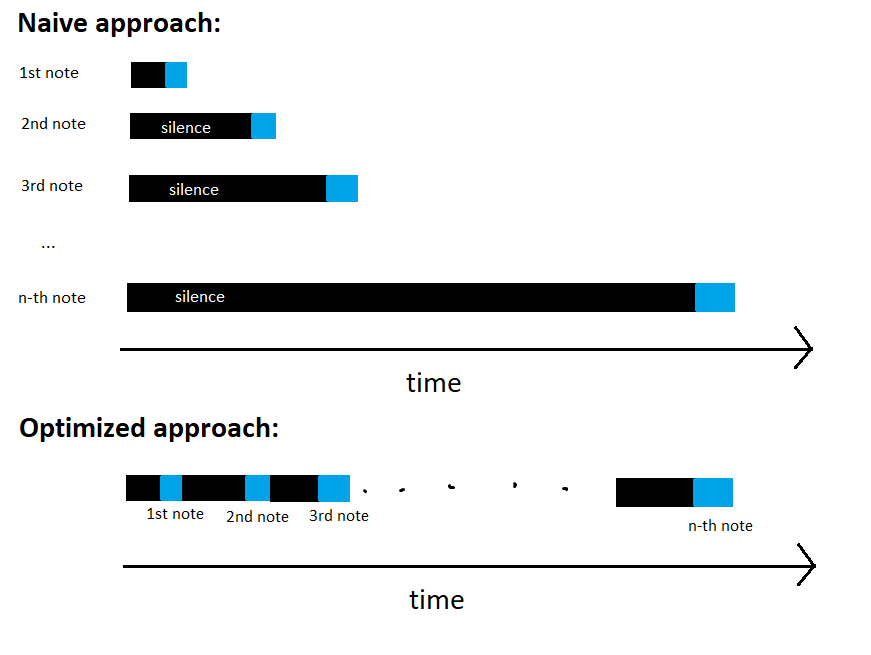
The simplest way would be: For every note at timestamp t, prepend t seconds of silence, then play the note, and then finally play everything simultaneously. This works, but has some serious issues:
- Performance drops extremely fast as song size grows. (From a complexity point of view, this behaves like an O(n²) approach as the number of notes grows.)
- Sounds in later sections would get drowned out or noticeably quieter for unclear reasons.
Hence I settled for a more efficient approach:
- For each instrument, all notes are played consecutively, inserting silence only where needed
- Each instrument track is built independently
- All instrument tracks are then combined using
simultaneously(...)
Even though this is a lot more complicated to implement, it scaled much better and loaded significantly faster than my previous approach. (From a complexity point of view, this behaves like an O(n) approach.)
Bonus: A short runtime analysis of the two approaches
In the naive approach, every note scheduled at time t is implemented by:
- inserting t seconds of silence
- followed by the actual note
- then playing all notes simultaneously
If the song contains n notes with increasing start times, this means:
- silence is repeated many times
- each additional note adds more silence than the previous one
- total silence duration grows roughly with the sum of all timestamps
In effect, the total work performed grows quadratically with the number of notes.
In contrast, the final approach builds each instrument track once, inserting silence only between consecutive notes. This ensures that total work grows linearly with the number of notes.
4. Results
The full pipeline and generated Source code are available here.
The final output is a Source program that plays the first 49 seconds of Lagtrain, reconstructed entirely from MIDI data.
The generated code loads in around 15 seconds on my machine and plays back smoothly without noticeable lag. While it’s obviously not a perfect recreation, the melody and timing are surprisingly accurate and clearly recognizable.
This entry ended up winning the Game of Tones contest!
I think the result worked really well because MIDI already encodes strong structural timing, which I could map seamlessly into Source’s sound model.
This ended up taking around 2-3 days for me, with most of the time spent on trial and error. Despite that, I still had a lot of fun in the end, and winning the contest was the cherry on top.
5. Closing thoughts
Overall, this project was less about recreating Lagtrain and more about building a small pipeline to translate structured data into a constrained output format. Similar to my previous Bad Apple projects (such as playing it in a terminal), the core challenge was taking an existing data representation and reshaping it so it could survive under very different limitations.
Although the idea sounds simple on the surface, getting it to work smoothly required many careful engineering decisions — from filtering instruments and cutting off the song, to reconstructing notes from events and choosing an efficient playback strategy in Source. Each step involved tradeoffs between accuracy, performance, and practicality.
In the end, it was exactly this process of designing around constraints that made the project fun and rewarding, and turning it into a working, performant result — with a contest win on top — felt especially satisfying.