Does vibe coding actually work? What I learned from real-world projects as a year 1 student
1. Intro
The problem
One day, I was tasked with building a full stack database management system for my mom’s university, completely on my own. At the time, I was a 12th grader whose entire background was mostly competitive programming, with basically no real world development experience (aside from a few small silly projects and Discord bots).
Early struggles
Fast forward a few days, I tried to learn Vue.js but couldn’t even get a decent layout on the screen. I mean, it’s pretty much expected, after all UI work is not like solving algorithmic problems. Eventually I gave up, grabbed a free template online, and started building on top of it. At least then I had something to work with. Still, progress was slow, and the result doesn’t look very promising.
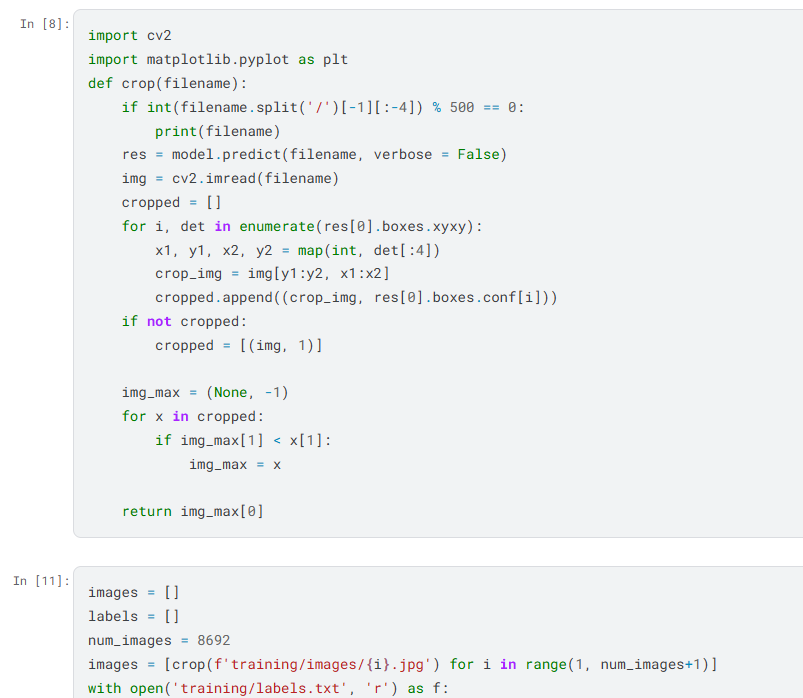
This was also my first time using AI in a project of this scale. I was not new to the idea of vibe coding (I had used it quite a bit in past AI competitions, it was pretty fire IMO). But this is different. This isn’t code I would write for a few days and forget about. This was a real project with real users and real consequences. Going in, I didn’t even know what best practices for AI coding were supposed to look like.
Discovering Copilot
At first, I treated it the same way I did in competitions: prompt a chatbot, copy the code, and move on. It worked, but felt clunky and limiting. Things changed when I discovered Copilot and agent style workflows (or what people nowadays would call “vibe coding”). Suddenly, one or two sentences could turn into hundreds of lines of code.
That was the moment I truly felt the power everyone was talking about. It was also when I started going a little too deep down the rabbit hole.
2. When vibe coding felt like a superpower
The magic
Ideas that would normally take hours were suddenly taking five minutes. I would type a couple of sentences, and an entire new page would just appear out of nowhere. I did not have to spend hours reading documentation, thinking through layout designs, or debugging random typos just to get something on the screen.
It really felt like Stack Overflow on steroids. Even ideas I struggled to clearly explain somehow came out looking right. The output felt complete, polished, and (at least on the surface) correct. It was kind of insane. A full page of functionality that would normally take forever just to piece together was suddenly there.
The realization
That was when things really clicked for me. I started to understand why people were worried about AI taking over. This was not even like the old prompt and copy workflow I was used to. It genuinely felt like the AI was doing the work for me (at least, that is what I thought).
3. When things start to go wrong
Hallucinations
As I keep going, problems started to surface. Simple prompts kept spitting out massive chunks of code. Entire pages would show up from a short (and vague) description. But that’s exactly the problem. Those pages almost always came with way more than I asked for:
- Extra features
- Abstractions
- Layers of logic I never planned on building
I didn’t specify enough, and the AI happily made those decisions for me.
Loss of understanding
And when the code finally appeared, half the time I didn’t even know what I was looking at. I just trusted what it spat out and moved on. It felt fine initially - I mean, things were still “working”, so why worry? But as the project grew, that shortcut started catching up to me.
Debugging nightmare
Bugs started to show up. Not obvious ones, but the annoying and subtle issues buried somewhere deep inside these giant piles of “clean” code. At that point, typing “fix this” into a prompt isn’t going to cut it. There wasn’t really any other way besides diving into the code myself the old-fashioned way.
Trying to understand what was going on in those files was… not fun. Every bug took tens of minutes just to understand what’s going on, let alone fix. Debugging often felt slower than if I’d just written everything by hand from the start. And even when I did “fix” something, it didn’t feel like real understanding. It felt more like patching holes on a boat that was sinking faster than I could keep up.
Limits of AI
And even not talking about the bugs, I still hit the limits of vibe coding. Bigger features are always a gamble. Lots of times the AI would get stuck in loops, endlessly adding and removing files for no apparent reason. Other times it would partially rewrite or outright corrupt files that were already working.
I can’t count the number of times where I stared at the screen, watching it go back and forth, before sighing and typing git reset --hard HEAD, starting over. It felt even more exhausting than debugging myself (and I have plenty of experience debugging in competitions!)
Wake-up call
That was the wake-up call. If I kept using AI the same way, the project wasn’t going to get easier, it was only going to get harder to manage. I had to rethink how I was using this tool, or consider starting over.
4. Second attempt
New project
After finishing this project, I wasn’t really happy with it. Even though everything worked fine, it didn’t feel like I learnt anything from this project besides patching the monstrosity that I generated over and over. But there is a chance to redeem myself. I took on another full-stack project, with pretty much the same requirements as the first one, but on a much bigger scale:
- More users
- More data
- More features
- Higher expectations
Still solo, no team, no guidance, no code reviews, and no safety net besides Git.
New mindset
However, my mindset had changed. I stopped thinking in terms of “ask it to build this giant thing and pray that it works” and started breaking things down into small, manageable chunks. Not only would the AI be able to easily digest that, but it also is for my own growth and experience (I still want to learn something, after all).
I figured, If I couldn’t even explain a task clearly, do I really expect the AI to handle it properly and reliably?
Planning
This time, I actually planned things before writing code (way more than I did before, it was pretty overwhelming). For example, in the frontend, I’d sketch out the layouts in PowerPoint, screenshot them, and send them along with specific instructions
(I have no idea if this is good practice 🙏 pls forgive me frontend people)
This usually meant the AI got it mostly right on the first try, and I only had to make small changes afterwards. For the backend, I clearly defined my MongoDB models in a single prompt, how auth and middleware should work, and asked the AI to lay out a detailed plan for endpoints before generating anything.
More mistakes
That said, there were still times where I messed up like the past project. One time I somehow ended up with a file that was almost 1900 lines long (what?). Every little change added up, and I kept telling myself to clean it later.
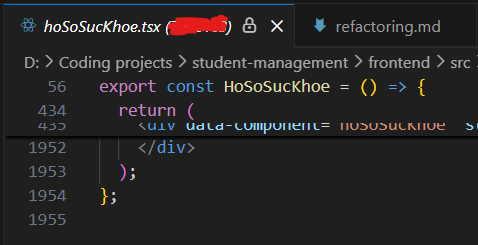
When I finally tried to refactor it (because the AI literally can’t add features without outright corrupting the file), that turned into two straight hours of painful back and forth. The AI kept hallucinating, breaking stuff, and just did weird things in general. It wasn’t a fun time, but there were plenty of lessons learned afterwards.
Learning things the hard way
That experience forced me to learn some real software engineering lessons the hard way (I guess it’s the best way to learn, after all..?). I started caring more about:
- Structure
- Splitting files into managable chunks
- Actually thinking about sustainable coding
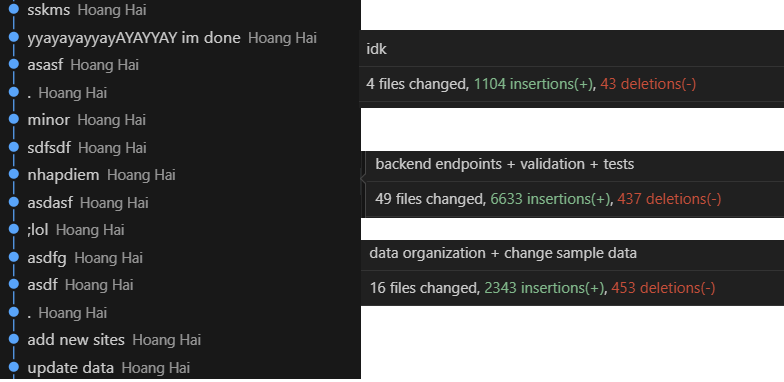
I learned to stop making giant commits with thousands of lines and with nonsense commit messages like asfjahsflkhf. Because well, smaller commits just make everything easier to track, organize, and actually debug when things go wrong.
Prompting
As the project went on, I also got better at prompting. I became more specific, scoped things tighter, and stopped overwhelming the AI with too many things at once. I even started using a separate AI just to help write better prompts.
I also added tests later on, which helped a lot. Tests made it obvious when something broke and gave me more confidence moving forward.
My overall experience
The project was still huge and beyond my experience level. But this time, it actually felt managable. I wasn’t constantly fighting the codebase anymore. It felt like I was actually in control.
5. Takeaways
AI Coding is still coding !!
One thing I learned the hard way is that AI assisted coding is still just coding. The only difference is that instead of writing code directly, you’re writing “code” in human language, but still for a machine.
You can’t really expect to make something without hyper-specific details in code, so why would it be any different wth AI coding? If you don’t understand what you’re building, the AI will happily guess for you (and those guesses will add up over time).
Does vibe coding actually work?
Yes (kind of). Even with AI, coding skills, planning, and even basic project management still matter just as much. AI is wonderful at turning clear intent into code and saving you from spending time writing tedious code over and over again, but it cannot decide what should exist in the first place or why. That part still very much needs a human.
Will AI replace programmers?
Probably not. AI just changes how we develop software. You still need someone to “code” the AI with clear goals, structure, and constraints. Vibe coding can get you started, but it won’t really carry a meaningful project on its own.